
Introduction: Where Automation Meets Expectation
WhatsApp has become one of the most powerful channels for business communication in recent years. With over 2 billion active users, it’s where your prospects, leads, and customers are already talking — and expecting fast, helpful, and human conversations.
But as businesses scale their outreach, the challenge becomes clear:
How do you automate WhatsApp messaging at scale without sounding like a bot?
That’s the new gold standard — automation that feels real, relevant, and responsive.
In this blog, we’ll explore how to:
- Use WhatsApp automation effectively inside a CRM
- Avoid generic bot-like interactions
- Maintain warmth and personalization at scale
- Leverage Hello CRM’s AI features for human-first automation
Why WhatsApp Is a Game-Changer for Business Communication
- 95% open rates within the first few minutes
- 2-way interaction — unlike email or SMS blasts
- Rich media support — send PDFs, images, videos, voice notes
- Global reach — especially in emerging markets
- Instant familiarity — customers are already using it daily
WhatsApp has blurred the lines between personal and business messaging — and that’s exactly why it works. Customers expect a conversation, not a campaign.
The Risk of Poor WhatsApp Automation: Why People Tune Out
While automation can save time and scale outreach, doing it wrong turns WhatsApp into just another ignored inbox.
Common automation mistakes:
- Robotic, one-size-fits-all messaging
- Ignoring responses or taking too long to reply
- Overuse of template messages
- Lack of personalization
- Not escalating to a human when needed
The result?
- Dropped conversations
- Lost trust
- Lower engagement rates
- Complaints or message reporting
Automation should enhance conversations, not replace them.
What Human-Centered WhatsApp Automation Looks Like
Successful WhatsApp automation is responsive, relevant, and respectful.
Here’s what that means in practice:
Contextual
Automation should respond based on:
- Where the user came from (e.g., ad, website form)
- What they interacted with (e.g., product page, download)
- What stage they’re in (e.g., new lead vs. repeat customer)
Personalized
Don’t just drop in a name — personalize:
- Timing
- Offer
- Language/tone
- Follow-up based on behavior
Interactive
Let users reply naturally. Guide them, but don’t box them in with rigid chatbot flows. Let automation handle FAQs, but always give an option to speak to a human.
Step-by-Step: How to Automate WhatsApp in Hello CRM Without Losing the Human Touch
1. Map the Customer Journey
Start by identifying key moments for automated outreach:
- New lead captured
- Form filled or product viewed
- Demo scheduled
- Quote sent
- Payment link shared
- Follow-up needed
- Review or feedback request
Hello CRM lets you build smart automation workflows that trigger messages at each of these points — with logic and intent.
2. Build Conversation Templates (Not Blasts)
WhatsApp requires pre-approved message templates for outbound automation. That doesn’t mean your messages need to feel like templates.
Structure each like a real conversation:
- Greet them by name
- Refer to context (e.g., “your demo request”)
- Offer clear next steps
- Ask questions (e.g., “Do you prefer a morning or afternoon slot?”)
3. Use Dynamic Personalization
Hello CRM supports smart fields like:
- First name
- Product of interest
- Recent activity
- Rep assigned
- Custom tags
This lets you create message templates like:
“Hi {{FirstName}}, I saw you checked out our lead automation tools. Would you like to schedule a demo with one of our AI experts?”
4. Time It Right
Avoid sending messages late at night or on weekends. With Hello CRM, you can:
- Set time windows based on recipient time zone
- Stagger large campaigns to avoid spam detection
- Schedule drip sequences over several days
5. Escalate When Needed
Nothing kills a good conversation like no response from the business when the customer replies.
In Hello CRM:
- AI agents can handle replies to common questions
- Smart routing sends complex queries to the right rep
- The system notifies humans when the conversation needs a personal touch
You get the best of both worlds — automation + empathy.
Use Case Examples
Use Case 1: Instant Response to Lead Capture
Trigger: User fills form on pricing page
Message:
“Hey Rahul, thanks for checking out Hello CRM’s pricing! Want help picking the right plan for your team?”
Outcome: The AI waits for a reply, and can schedule a demo or send more info based on response.
Use Case 2: Abandoned Quote Follow-Up
Trigger: Proposal sent, but no reply after 48 hours
Message:
“Just checking in, Sarah — did you get a chance to review your proposal? Happy to jump on a quick call if you have questions.”
Outcome: Polite nudge, re-engagement, and lead moved to next stage.
Use Case 3: Feedback Collection After Support Interaction
Trigger: Ticket closed
Message:
“Thanks for chatting with our team! Quick one — how would you rate your experience with Hello CRM on a scale of 1 to 5?”
Outcome: Easy feedback loop. AI logs data automatically.
How Hello CRM Keeps WhatsApp Messaging Human-Centric
What sets Hello CRM apart from typical WhatsApp bots or integrations?
- Full integration with customer history
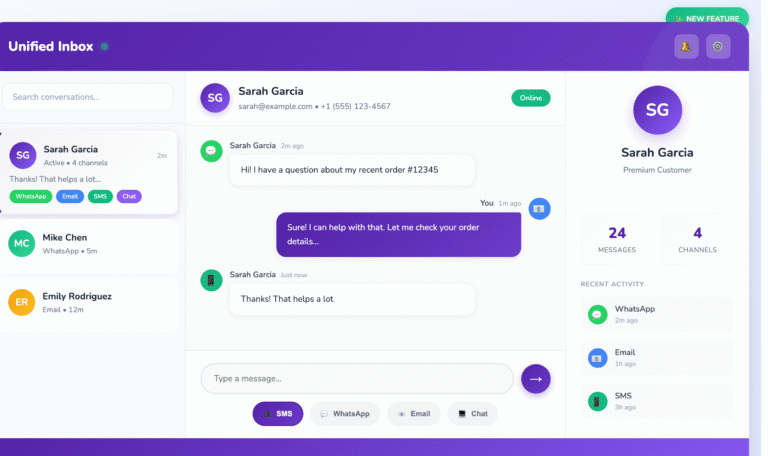
- Unified timeline across SMS, email, voice, and WhatsApp
- Human override for all automated conversations
- AI that adapts to tone and response
- Lead scoring and pipeline updates based on conversations
- Built-in compliance for template messaging and opt-outs
Whether it’s one lead or one thousand, every message feels personal — and every reply is logged, tracked, and acted on.
Conclusion: Automate Conversations, Not Relationships
In 2025, customers expect two things from your business:
- Speed
- Authenticity
WhatsApp automation lets you deliver both — but only when done right.
With Hello CRM, you can:
- Automate outreach with intelligence
- Keep context and tone personalized
- Scale engagement without losing the human element
- Route real people in when it matters most
Automation isn’t about replacing your team — it’s about freeing them to focus on what humans do best: building trust, closing deals, and solving complex problems.
Start the conversation right — and let Hello CRM carry it forward, every step of the way.
Want help setting up your first WhatsApp workflow in Hello CRM?
Book a live demo or start your free trial today. Let your automation sound like you — not a script.